SQL Practice: Two Tables, One Key (Weather and Bike Rides)
Practice JOIN on a small two-table database: a table of days that holds a number, and a lookup table that says what the number means. Show, filter and average by the name, not by the number.
Last updated:
Why keep the weather in a second table?
In the guide’s table daily_ridership, every day carries its weather as text, such as Mist or cloudy.
Here the text is kept once, in a small lookup table, so that it is not repeated in 731 rows, and the table of days holds only a short number that points to it.
This practice uses that structure on the same real bike-share days as the guide.
To show a weather name next to a day, filter by a weather name, or average per weather name, you need a JOIN.
This practice continues part 2 of the DB Browser SQL guide; try each question before you open the answer.
Every query can also run in your browser: type it into the box under the question.
Get the data
The values are the same real daily values as in the guide’s practice database (731 days in 2011 and 2012, from the Bike Sharing dataset of Hadi Fanaee-T, UCI Machine Learning Repository).
We only moved the weather text into its own table. Download sql-practice-weather.sqlite and open it with Open Database in DB Browser.
As always, work on a copy of the file.
The two tables
| Table | One row describes | Columns |
|---|---|---|
days | One day | day_id, observation_date, season, working_day, weather_id, total_rides |
weather_types | One kind of weather | weather_id, weather_name |
The whole lookup table has three rows:
weather_id | weather_name |
|---|---|
| 10 | Clear or partly cloudy |
| 20 | Light rain or snow |
| 30 | Mist or cloudy |
weather_idis the primary key ofweather_types, so each row there is identified by it. Indays, the same column is a foreign key: each day keeps there the key of its kind of weather, so it points to exactly one row ofweather_types. Keys are explained in part 2 of the guide.working_dayis1for a working day and0otherwise.total_ridesis the number of rentals that day.- A
JOINpairs each row ofdayswith the row ofweather_typesthat has the sameweather_id. The key is a number, so the result can show the name that the number stands for.
Practice
Write each query before opening the answer. The first question has the same shape as the others:
show columns from both tables.
1. Show the date, the weather name and the number of rides of each of the first five days.
Show a possible answer
SELECT d.observation_date,
       w.weather_name,
       d.total_rides
FROM days d
INNER JOIN weather_types w
    ON d.weather_id = w.weather_id
ORDER BY d.day_id
LIMIT 5;
The first day, 2011-01-01, had Mist or cloudy weather and 985 rides.
The names come from weather_types; days holds only the number.d and w are table aliases.
A plausible mistake: the wrong columns in ON
The reasoning: ON needs two columns that are equal, and two id columns look alike.
But day_id numbers days and weather_id numbers kinds of weather, so they are not the same key, and almost no rows match.
SELECT d.observation_date,
       w.weather_name,
       d.total_rides
FROM days d
INNER JOIN weather_types w
    ON d.day_id = w.weather_id
ORDER BY d.day_id
LIMIT 5;
2. Show the date and the number of rides of every day with Light rain or snow, sorted by the number of rides in ascending order.
Show a possible answer
SELECT d.observation_date,
       d.total_rides
FROM days d
INNER JOIN weather_types w
    ON d.weather_id = w.weather_id
WHERE w.weather_name = 'Light rain or snow'
ORDER BY d.total_rides;
There are 21 such days, and the fewest rides, 22, were on 2012-10-29.
The condition is on the name, so it is written on w.weather_name, a column of the lookup table.
Without the JOIN you would have to remember that Light rain or snow is number 20.
A plausible mistake: a name that is spelled differently
The reasoning: The name looks obvious, so it is typed from memory.
But the text must match the stored text exactly, and Light rain is not Light rain or snow:
no row matches, and the result is empty.
SELECT d.observation_date,
       d.total_rides
FROM days d
INNER JOIN weather_types w
    ON d.weather_id = w.weather_id
WHERE w.weather_name = 'Light rain'
ORDER BY d.total_rides;
When a condition on text returns nothing, run SELECT * FROM weather_types; to see the exact names.
3. For each kind of weather, show its name, the number of days and the average number of rides per day, rounded to one decimal. Sort the result by the average, in descending order.
Show a possible answer
SELECT w.weather_name,
       COUNT(*) AS days,
       ROUND(AVG(d.total_rides), 1) AS average_rides
FROM days d
INNER JOIN weather_types w
    ON d.weather_id = w.weather_id
GROUP BY w.weather_name
ORDER BY average_rides DESC;
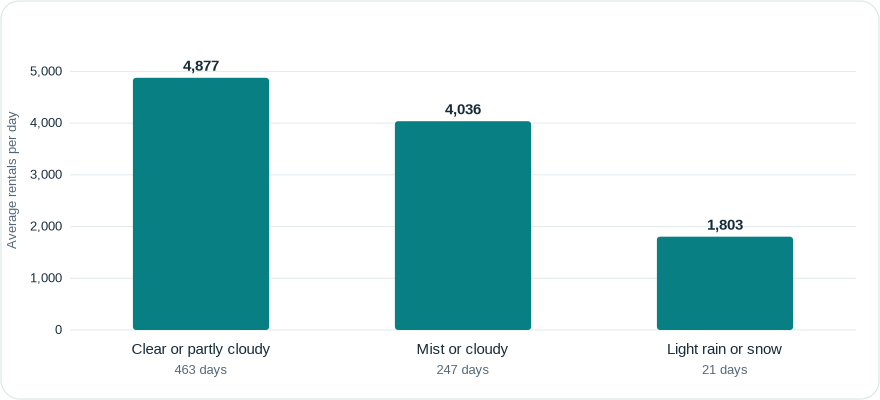
The result has one row per kind of weather: Clear or partly cloudy (463 days, 4,876.8 rides a day), Mist or cloudy (247 days, 4,035.9) and Light rain or snow (21 days, 1,803.3).
On a rainy or snowy day, the system rents less than half as many bikes.
Only 21 days is a small group, so treat that average with care.
A plausible mistake: no GROUP BY
The reasoning: AVG computes an average, so it seems enough to add the weather name.
But without GROUP BY, AVG averages all the days and the query returns a single row, with one arbitrary weather name next to the overall average.
SELECT w.weather_name,
       COUNT(*) AS days,
       ROUND(AVG(d.total_rides), 1) AS average_rides
FROM days d
INNER JOIN weather_types w
    ON d.weather_id = w.weather_id
ORDER BY average_rides DESC;
4. How many working days had Mist or cloudy weather?
Show a possible answer
SELECT COUNT(*) AS days
FROM days d
INNER JOIN weather_types w
    ON d.weather_id = w.weather_id
WHERE w.weather_name = 'Mist or cloudy'
  AND d.working_day = 1;
The answer is 177 days. One condition is on the lookup table (w.weather_name) and one on the main table (d.working_day); both belong in the same WHERE.
A plausible mistake: a JOIN without ON
The reasoning: The two tables are already named in the query, so the ON line seems optional.
But without ON, SQLite pairs every day with every kind of weather, and the weather condition then keeps all the working days, whatever their real weather.
SELECT COUNT(*) AS days
FROM days d
INNER JOIN weather_types w
WHERE w.weather_name = 'Mist or cloudy'
  AND d.working_day = 1;
5. Which kinds of weather had an average of more than 4,000 rides a day? Show the name and the average rounded to a whole number, highest first.
Show a possible answer
SELECT w.weather_name,
       ROUND(AVG(d.total_rides), 0) AS average_rides
FROM days d
INNER JOIN weather_types w
    ON d.weather_id = w.weather_id
GROUP BY w.weather_name
HAVING AVG(d.total_rides) > 4000
ORDER BY average_rides DESC;
Two kinds of weather qualify: Clear or partly cloudy (4,877) and Mist or cloudy (4,036).
A condition on an average is a condition on a group, so it belongs in HAVING, after GROUP BY.
A plausible mistake: the condition in WHERE
The reasoning: The condition “more than 4,000” seems to belong in WHERE.
But WHERE filters single days before the groups are formed: it keeps only the days above 4,000 and then averages those, so all three kinds of weather appear with inflated averages.
SELECT w.weather_name,
       ROUND(AVG(d.total_rides), 0) AS average_rides
FROM days d
INNER JOIN weather_types w
    ON d.weather_id = w.weather_id
WHERE d.total_rides > 4000
GROUP BY w.weather_name
ORDER BY average_rides DESC;
What to remember
- A table that holds a number which points to a small lookup table is the usual way to avoid repeating text.
JOIN ... ONpairs each row with its lookup row by the key,ON big.key = lookup.key. - Write the condition and the grouping on the name (
w.weather_name), a column of the lookup table, and the numbers you calculate on the main table. WHEREfilters rows before grouping;HAVINGfilters groups after it. WithoutON, aJOINpairs every row with every row.- To save a result as a CSV file, right-click the results in DB Browser and choose Export or Save Results, as in the guide.
Source: Hadi Fanaee-T, Bike Sharing (2013), UCI Machine Learning Repository, as in the guide.
The values are unchanged; we added the lookup table weather_types and the key weather_id (reproducible with scripts/make-weather-db.py).