A Practical SQL Guide with DB Browser, Part 2: Change Data and Combine Tables
Change data safely, combine tables with JOIN, export results, and use the whole toolbox to answer the bike-share capacity question.
Last updated:
Before you start
This is the second part of the practical SQL guide. Part 1 opened the bike-share database, explained its columns and taught SELECT, WHERE, ORDER BY, LIMIT, the summary functions, calculations in a query, GROUP BY and HAVING.
Open the same database file again in DB Browser (or in the query boxes on this page), because the examples continue from it.
This part adds the commands that change data and combine tables, and shows how to export a result.
The review practice and the question that started the guide, when does a bike-share system need capacity?, are on a page of their own.
In this guide
ContentsChange data
Change data: insert, update, and delete
Goal: practice changing data without touching the source observations.
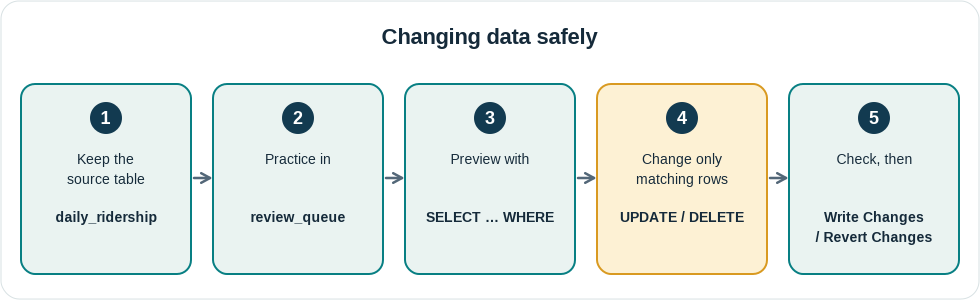
The daily_ridership table contains the source data for analysis.
Leave it unchanged. The empty review_queue table is provided for practice.
In DB Browser a change stays in memory until you select Write Changes; Revert Changes cancels everything since the last write, so you can always return to the original file.
INSERT INTOadds one or more rows to a table. You can copy the result of a selection query into it.UPDATEchanges values in an existing row. AfterSET, name the column and its new value; useWHEREto identify the row.DELETE FROMremoves rows. Restrict it withWHERE; without that condition, bothUPDATEandDELETEaffect every row in the table.
Example: copy the five busiest summer observations to the review table.
The names in brackets after the table name say which columns receive the values, and the SELECT must return the same number of columns in the same order:
INSERT INTO review_queue
    (record_id, observation_date, season, working_day, weather, total_rides)
SELECT record_id, observation_date, season, working_day, weather, total_rides
FROM daily_ridership
WHERE season = 'Summer'
ORDER BY total_rides DESC
LIMIT 5;
Example: add a note to one of the copied rows. After SET come the column and its new value, and WHERE picks the row, here by its record_id (631 is the second busiest summer day, one of the copied rows):
UPDATE review_queue
SET review_note = 'Check weekend staffing'
WHERE record_id = 631;
Example: delete that row:
DELETE FROM review_queue
WHERE record_id = 631;
Without the WHERE condition every row of the table would be deleted.
Practice
Try it, update: The review table review_queue holds the five busiest summer observations.
For the row with record_id 624, update the review note (review_note) to 'Review summer service schedule'.
Show one possible update
UPDATE review_queue
SET review_note = 'Review summer service schedule'
WHERE record_id = 624;
Try it, delete: The review table review_queue holds the five busiest summer observations.
Delete the row with record_id 624 from it, so that four rows remain.
Show one possible deletion
DELETE FROM review_queue
WHERE record_id = 624;
Show a risky mistake and why it happens
These statements affect every row because they have no WHERE condition:
UPDATE review_queue
SET review_note = 'Review';

DELETE FROM review_queue;
This mistake may seem reasonable if you assume the table contains only one observation.
Before changing data, check the row condition and run a selection query to inspect the matching rows.
Combine tables with JOIN
Databases often split information across several tables and link them with keys:
- A primary key is a column whose value identifies each row of a table, so no two rows have the same value. For example, the department number in a table of departments.
- A foreign key is a column in one table that holds the primary key of a row in another table, and so links to it. For example, the department-number column in a table of employees: each employee keeps there the key of their department, and the information about the department itself is in the other table.
So one table may store a department number for each employee, and another table may store the name that goes with each number.
A JOIN lets one query use columns from both tables.
The practice database has only one data table, so we create a tiny second table to practice with.
It is an invented table for teaching, not real data: it translates each season into a service plan, a kind of table called a lookup table.CREATE TABLE gives the table a name and lists its columns with their types, and INSERT INTO adds rows; the keyword VALUES introduces the rows to add, one pair of brackets for each row.
Run the two statements together (use the button that executes all statements):
CREATE TABLE season_plan (
    season TEXT,
    service_plan TEXT
);

INSERT INTO season_plan (season, service_plan)
VALUES ('Winter', 'Reduced service'),
       ('Spring', 'Normal service'),
       ('Summer', 'Extra staff'),
       ('Fall', 'Normal service');
The new table is kept only in memory until you select Write Changes.
Select Revert Changes when you finish, so the file stays as it was, or Write Changes if you want to keep it.
Match rows with INNER JOIN
The shared key here is season: it appears in daily_ridership and in season_plan.
The query below uses three pieces of notation, so here is what each means before you read it:
table_name.column_name, for exampleseason_plan.service_plan, says which table a column belongs to. You must write it this way when both tables have a column with the same name, such asseason; otherwise SQLite cannot tell which one you mean.INNER JOINcombines two tables. The word “inner” means that the result keeps only the rows that have a match in both tables, so a row with no match in the other table does not appear.ONstates the matching condition: which column of the first table must equal which column of the second table.
In words: take each row of daily_ridership and pair it with the rows of season_plan that have the same season.
SELECT daily_ridership.observation_date,
       daily_ridership.season,
       season_plan.service_plan
FROM daily_ridership
INNER JOIN season_plan
    ON daily_ridership.season = season_plan.season
LIMIT 5;
FROM names the first table, INNER JOIN names the second, ON pairs their rows, and SELECT can then choose columns from either table.
The other clauses work as before: WHERE filters the joined rows, and GROUP BY groups them.
A short name for a table
Writing the full table name before every column makes a query long.
After a table name in FROM or in INNER JOIN we can add a short name for that table, called a table alias, and use it everywhere else in the query.
This is the same query as above, with d for daily_ridership and p for season_plan:
SELECT d.observation_date,
       d.season,
       p.service_plan
FROM daily_ridership d
INNER JOIN season_plan p
    ON d.season = p.season
LIMIT 5;
FROM daily_ridership d says that in this query d stands for daily_ridership, so d.season is the column season of daily_ridership.
The result is the same as before. Writing daily_ridership AS d means the same, with the keyword AS as for a name of a result.
The alias lasts only for this query and does not rename the table.
Choose letters that remind you of the table.
Count the days in seasons with the plan Extra staff:
SELECT COUNT(*) AS days
FROM daily_ridership
INNER JOIN season_plan
    ON daily_ridership.season = season_plan.season
WHERE season_plan.service_plan = 'Extra staff';
The result is 188 days, all of them Summer. Now calculate the average daily rentals for each plan:
SELECT season_plan.service_plan,
       ROUND(AVG(daily_ridership.total_rides), 0) AS average_rentals
FROM daily_ridership
INNER JOIN season_plan
    ON daily_ridership.season = season_plan.season
GROUP BY season_plan.service_plan
ORDER BY average_rentals DESC;
The result has three rows: Extra staff (about 5,644 rentals a day), Normal service (about 4,862, from Spring and Fall together), and Reduced service (about 2,604).
Spring and Fall share one plan, so they become one group.
Three tables, and the short form JOIN
Written alone, JOIN means INNER JOIN, so these two are the same join:
FROM daily_ridership
JOIN season_plan ON ...

FROM daily_ridership
INNER JOIN season_plan ON ...
To use three tables, write a second JOIN after the first; each one has its own ON.
The rows of the first two tables are paired first, and the third table is then matched to the result.
Here is a third invented table, weather_alert, which says what to check on days with each kind of weather.
Run the two statements together, as for season_plan:
CREATE TABLE weather_alert (
    weather TEXT,
    alert TEXT
);

INSERT INTO weather_alert (weather, alert)
VALUES ('Clear or partly cloudy', 'No alert'),
       ('Mist or cloudy', 'No alert'),
       ('Light rain or snow', 'Check rain gear');
Now count the days for each service plan and alert, using the two lookup tables together:
SELECT season_plan.service_plan,
       weather_alert.alert,
       COUNT(*) AS days
FROM daily_ridership
JOIN season_plan
    ON daily_ridership.season = season_plan.season
JOIN weather_alert
    ON daily_ridership.weather = weather_alert.weather
GROUP BY season_plan.service_plan, weather_alert.alert
ORDER BY season_plan.service_plan, weather_alert.alert;
The result has six rows, one for each pair of a plan and an alert.
For example, Normal service with No alert has 349 days, and Extra staff with Check rain gear has 4.
As before, a day whose season or weather has no row in a lookup table would not appear.
Practice
Try each question before opening the answer. The questions use the season_plan table.
In DB Browser you created it in the JOIN section; in the boxes on this page, first run the CREATE TABLE and INSERT example of that section (select Try this query under it, then Run), because the table exists only in this page’s memory until you do.
Question 1. Show the date, season, and service plan of the five days with the most rentals.
Show a possible answer
SELECT daily_ridership.observation_date,
       daily_ridership.season,
       season_plan.service_plan,
       daily_ridership.total_rides
FROM daily_ridership
INNER JOIN season_plan
    ON daily_ridership.season = season_plan.season
ORDER BY daily_ridership.total_rides DESC
LIMIT 5;
The join adds the plan to each day, and then the query sorts and limits the joined rows as usual.
A plausible mistake: no ON condition
The reasoning: naming both tables should be enough, because SQL knows they both have season.
But without ON, the query pairs every row of the first table with every row of the second:
731 days times 4 plans give 2,924 rows, most of them mismatched.
SELECT daily_ridership.observation_date,
       season_plan.service_plan
FROM daily_ridership
INNER JOIN season_plan;
A plausible mistake: an ambiguous column name
The reasoning: writing season is shorter and the meaning seems clear.
But both tables have a column named season, so SQLite reports ambiguous column name: season.
Write daily_ridership.season or season_plan.season.
SELECT season, service_plan
FROM daily_ridership
INNER JOIN season_plan
    ON daily_ridership.season = season_plan.season;
Question 2. Delete the row of Fall from season_plan and run the join again without LIMIT, counting its rows.
How many rows does it return, and why?
Show a possible answer
DELETE FROM season_plan
WHERE season = 'Fall';

SELECT COUNT(*) AS joined_rows
FROM daily_ridership
INNER JOIN season_plan
    ON daily_ridership.season = season_plan.season;
The result is 553, not 731. The 178 days of Fall have no matching row in season_plan, so INNER JOIN drops them without any warning.
When a join returns fewer rows than you expect, check which keys have no match.
A LEFT JOIN keeps every row of the first table and fills the missing values with NULL.
It is a separate kind of join, and this guide works with INNER JOIN.
Select Revert Changes afterwards, so that season_plan has all four seasons again.
For more practice with JOIN on two tables that are linked by a number, continue to SQL Practice: Two Tables, One Key.
Export results to CSV from DB Browser
- Run a query in Execute SQL.
- Right-click inside the results table and choose Export or Save Results (the label depends on the DB Browser version).
- Choose CSV, select a location, and save.
In the query boxes of this guide, select Download CSV under a result instead.
Name the file in the box next to the button, for example 1 for a file called 1.csv.
For example, export the seasonal summary to share it with a colleague or use it in a later analysis.
Keep in mind
INNER JOIN ... ONcombines two tables by a shared key; writetable.columnwhen both have the same column name.JOINalone meansINNER JOIN, and a secondJOIN ... ONadds a third table.- A table alias (
FROM daily_ridership d) is a short name for a table inside one query. INSERT INTO,UPDATE table_name SET ..., andDELETEchange data. Practice inreview_queue, not in the source table.- The review questions and the practical question of the guide are on their own page.
Continue learning
For more about structured data, tables, and databases, return to the opening-unit section on structured data and databases.