From a Web Page to Data: Beautiful Soup
Request a real web page with Python, see how its tags are organized, and use Beautiful Soup to find one element of a real arXiv page and read its text and its link.
Last updated:
In this lesson we learn how a program asks for a web page, how the tags of an HTML page are organized into elements with attributes, and how the Python library Beautiful Soup finds one element and reads its text and its attributes.
Which hardware papers appeared this month?
arXiv (pronounced “archive”) is a free archive where researchers post scientific papers.
Its section Hardware Architecture, cs.AR, lists papers on how processors, memories and accelerators are designed.
The list of October 2026 is one web page with 266 entries. We want the title, the link and the number of authors of each paper.
The list is shown as a web page, and a person can read the data there.
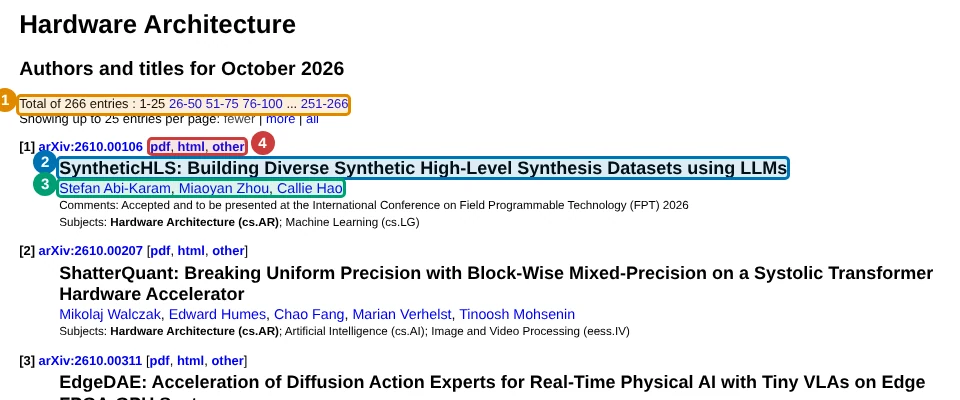
Reading data from web pages with a program is called web scraping.
A program can do what the person does if it can read the page.
Counting the authors of 266 papers by eye takes an hour; a program takes a second, and it does the same for the list of the next month.
In this lesson a program gets the page and reads the title and the link of the first paper from it.
The examples run in your browser: select Run from top to bottom, because the boxes of this page share their variables with each other.
If you press Stop or reload, run the page again from the top.
The first run of the page loads the libraries, so it can take a moment.
The notebooks of the lessons on reading web pages are one set, with the tasks numbered through it:
- The notebook with tasks: download · open in Colab
- The notebook with solutions: download · open in Colab
The practice site and its saved copy
The pages of this unit are real pages of arXiv, and its robots.txt (a file in which a site tells programs which of its pages they may read) allows the pages we use.
The browser lets a page on this site talk only to this site, so the code on this page reads a saved copy of the pages, kept on this site:
the list of October 2026 (its first 25 entries) and the page of each of its first eight papers.
The copies are the pages as arXiv sent them on 13 November 2026, unchanged.
The notebooks of this unit run the same code on the copy; their cells for the live site, where the numbers can differ, are off (RUN_LIVE = False):
a class shares one address, and arXiv asks for 15 seconds between requests.
The saved pages hold descriptive metadata of the papers (titles, authors, abstracts and subjects), which arXiv makes available for free use under the CC0 1.0 public-domain dedication, according to the terms of use of its API; the papers themselves belong to their authors and are not copied here.
The source of every page is arXiv.org. The links inside a copy lead to arXiv itself, so they do not open from this site.
Four rules before reading a site
A program that reads a site is a guest. Four rules keep it a welcome one:
- We read the
robots.txtof the site and follow it: it says which pages programs may read. - We wait between requests: arXiv asks for 15 seconds, and a class that shares one address counts as one visitor.
- We say who we are: a request can carry a name and a way to reach us (Reading pages responsibly shows how).
- We take only what the task needs, and no personal data.
A page is text with tags
When we type an address in the browser, the browser sends a request to the server that holds the page, and the server sends back a response.
The exchange follows the rules of HTTP, the way of talking of the web, and the address is a URL.
The response holds the text of the page, written in HTML: text wrapped in tags, words in angle brackets such as <dt> and </dt>, which tell the browser what each piece is.
The browser hides the tags and draws the page. A program that asks for the page receives the tags too.
The page is built of elements. An element is a piece of the page between an opening tag and a closing tag, and it can hold text and other elements.
Here is the beginning of the first entry of the list, as it is in the text of the page, with parts left out:
<dt><a name='item1'>[1]</a>
  <a href="/abs/2610.00106" title="Abstract">arXiv:2610.00106</a>
<dd>
  <div class='meta'>
    <div class='list-title mathjax'><span class='descriptor'>Title:</span>
      SyntheticHLS: Building Diverse Synthetic High-Level ...
    </div>
    <div class='list-authors'>
      <a href="https://arxiv.org/search/...">Stefan Abi-Karam</a>, ...
</div>- Nesting. The element
ddholds thedivof the classmeta, which holds thedivof the title, which holds aspan. The inner elements are the children of the outer one. - Attributes. An opening tag may carry attributes, pairs of a name and a value such as
href="/abs/2610.00106"ortitle="Abstract". The text of an element is what a reader sees; an attribute is information about the element, for example where a link goes. - Class. The attribute
classgives an element one or more names, herelist-titleandmathjax. Elements of the same kind share a class name, so the class is how a program tells a title from a line of authors.
Your turn. At the beginning of the entry above, where does the address /abs/2610.00106 of the paper’s page sit?
Show a hint
Compare what a reader sees on the page, arXiv:2610.00106, with what is written inside the opening tag of the same element.
A: in the text of the element `a`
The link can be clicked, so it feels as if the address is what we read.
But the text of the element is what a reader sees, arXiv:2610.00106, and the address of the page is not written there.
B: in the attribute `href` of the element `a`
Right. The text is what the reader sees; the address is information about the element, where the link goes, and it is written in an attribute, href="/abs/2610.00106".
A program reads it by the name of the attribute.
C: in the class of the element
The class gives the element a name for its kind, such as list-title or mathjax, so that a program can tell a title from a line of authors.
The address is not a name of a kind, and it is not written in the attribute class.
The browser shows the elements of the page as a tree. A right click on a part of the page and the item Inspect open the developer tools, with the clicked element marked.
When we want data from a page, this look decides what to write in code:
which tag holds it, which class or attribute tells it from the elements around it, and whether we need its text or an attribute.
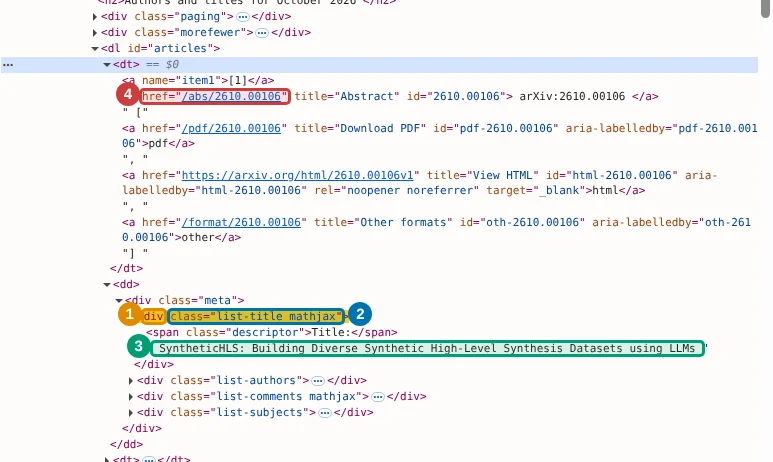
class, which tells what kind of element it is. Marker 3: the text that the element holds, the title of the paper. Marker 4: the attribute href of a link, the address it leads to.Asking for the page from Python
The library requests sends a request from Python. The first line of the next box imports it.
The function requests.get sends a request that asks for a page, and returns a response object:
everything that came back, kept in one variable. Two things in it are read first:status_code, a number that says how the request went (200 means that the page arrived), and text, the text of the page as one long string.
The function len returns the number of characters of a string.
The address is long, so it is written in two parts: two texts in quotes that stand next to each other, inside brackets, are joined by Python into one text, and the brackets let them go on in the next line.
import requests

list_url = (
    'https://dvirross.com/materials/courses/'
    'intro-data-science/arxiv-cs-ar-2026-10.htm'
)
response = requests.get(list_url)
print(response.status_code)
html = response.text
print(len(html))
200
46598The page is 46,598 characters long, much more than what we see on the screen, because most of it is tags.
Beautiful Soup reads the tags
Beautiful Soup is a Python library that reads the text of an HTML page and builds from it the tree of its elements, so that we can ask for an element instead of cutting text.
A program that reads text in a given format and builds a structure from it is a parser.
The library beautifulsoup4 is imported under the name bs4, and the class that we use is BeautifulSoup.
It takes two arguments: the text of the page, and the name of the parser, 'html.parser', the one that comes with Python.
The name comes from the song "Beautiful Soup" that the Mock Turtle sings in Lewis Carroll's Alice's Adventures in Wonderland. It also plays on "tag soup", the name for HTML that is messy and badly structured, which is the kind of page the library was made to read.
Two more names are needed. soup.title is the first element of the tag title in the page, and the name text written after an element, as in soup.title.text, gives all the text inside it.
from bs4 import BeautifulSoup

soup = BeautifulSoup(html, 'html.parser')
print(soup.title)
print(soup.title.text)
<title>Hardware Architecture Oct 2026</title>
Hardware Architecture Oct 2026The first line printed the element with its tags, and the second only the text that it holds.
find: the first element that fits
The method find of the soup returns the first element that fits what we ask.
We give it the name of a tag, and, to tell elements of the same tag apart, a class.
The word class is a reserved word of Python, so the argument is written class_.
title = soup.find('div', class_='list-title')
print(title.text)
Title:
SyntheticHLS: Building Diverse Synthetic High-Level Synthesis Datasets using LLMs
The text of the element is what the title holds, with its inner element:
the word Title: of the span, and the spaces and the line breaks of the page around the title.
Two string methods clean it. replace('Title:', '') replaces a piece of text with another one, here with nothing, and strip() removes the spaces and the line breaks from both ends of a string.
print(title.text.replace('Title:', '').strip())SyntheticHLS: Building Diverse Synthetic High-Level Synthesis Datasets using LLMsYour turn. What does find return when no element fits? Predict what the box prints, then run it.
This page has no element of the tag table.
print(soup.find('table'))NoneShow a solution
find returns None, the value that stands for “nothing”, and does not stop with an error.
The error comes one step later, when the program asks for .text of None, which is not an element.
A program that reads a real page has to expect that an element is not there.
An attribute is read with get
The link to the page of the first paper is not text on the screen:
it is the attribute href of an element a. The method get of an element returns the value of one attribute, given by name.
To find the element, find accepts any attribute as an argument:
the element a whose attribute title is Abstract.
link = soup.find('a', title='Abstract')
print(link.text.strip())
print(link.get('href'))
arXiv:2610.00106
/abs/2610.00106The text of the link is what a reader sees, the identifier of the paper; its attribute href is where the link goes.
The address starts with a slash and has no site name: it is relative to the site of the page, which is https://arxiv.org, so the page of this paper is https://arxiv.org/abs/2610.00106.
So far we gave the attribute as an argument, like title='Abstract', which fits <a title="Abstract">.
That works as long as the name of the attribute is not the name of a parameter of find.
At the top of the first entry there is the element <a name="item1">[1]</a>, and its attribute is called name.
The first parameter of find is also called name, and it is the name of the tag, so find('a', name='item1') raises a TypeError.
The argument attrs writes the condition on the attribute as a dictionary, and it works for every attribute.
We use it when the attribute is called name, or when its name is not valid as an argument, such as data-id (class also has the form class_).
The anchor item1 is found like this:
anchor = soup.find('a', attrs={'name': 'item1'})
print(anchor.text)[1]Moving inside an element
An element that find returned has a find of its own, which looks only inside it.
This is how we narrow the search: first the entry, then the part of the entry.
The first element dt of the page is the line with the identifier of the paper.
Its first link, dt.a, is a link that has no href: look at what get returns.
entry = soup.find('dt')
print(entry.a)
print(entry.a.get('href'))
<a name="item1">[1]</a>
NoneThe first a in the entry is the anchor [1], with the attribute name, which the page uses for its own jumps.
It has no href, so get returns None and does not fail. The entry holds more links, and the link that we want is the one with title='Abstract'.
Reading by position, “the first link”, is the weak point of a program; reading by what the element is, its class or its attribute, is the strong one.
The elements inside an element can also be reached by their tag name, one level after the other, with dots:first.div is the first div inside the entry first, and .div again is the first div inside it, which here is the title.
The method get_text returns the text of an element like text does, and takes arguments:get_text(' ', strip=True) joins the pieces of the text with a space and removes the spaces at the two ends.
first = soup.find('dd')
print(first.div.div.get_text(' ', strip=True))
Title: SyntheticHLS: Building Diverse Synthetic High-Level Synthesis Datasets using LLMsThe path first.div.div depends on the place of each element, so it breaks when the page adds a div before the title.
Reading by class_ does not.
Practice
Your turn. Print the title of the first paper of the list, without the word Title: and without the spaces around it, as one line.
# your code hereShow a hint
The title is in the div of the class list-title. Take its text, remove 'Title:' with replace, and clean the ends with strip.
Show a solution
title = soup.find('div', class_='list-title')
print(title.text.replace('Title:', '').strip())
SyntheticHLS: Building Diverse Synthetic High-Level Synthesis Datasets using LLMsShow a common mistake and why it happens
title = soup.find('div', class_='list-title')
print(title.text.strip())
The method strip removes only the spaces and the line breaks at the two ends.
The word Title: is the text of the inner span, and text returns it with the rest, so the line starts with Title: and a line break.
Your turn. The pdf of the first paper is a link with the attribute title equal to Download PDF.
Print the address in its attribute href.
# your code hereShow a hint
As in the link to the abstract, find('a', title='Download PDF') returns the element, and get('href') returns the address.
Show a solution
pdf = soup.find('a', title='Download PDF')
print(pdf.get('href'))/pdf/2610.00106The element is the first link on the page with that title, so it belongs to the first paper.
Show a common mistake and why it happens
pdf = soup.find('a', title='Download PDF')
print(pdf.text)
The text of the link is the word pdf, which a reader sees. The address is not text but the attribute href, so it is read with get.
Your turn. The subject of a paper is in a span of the class primary-subject.
Print the text of that element for the first paper of the list.
# your code hereShow a hint
find('span', class_='primary-subject') returns the first element of the page that fits, which is the one of the first paper.
Show a solution
subject = soup.find('span', class_='primary-subject')
print(subject.text)
Hardware Architecture (cs.AR)The text has no spaces around it, so no strip is needed. The paper also lists another subject, Machine Learning, but it is text outside this element, so find does not return it.
Show a common mistake and why it happens
subject = soup.find('span', class_='subject')
print(subject)
There is no element with the class subject: the class is primary-subject.find does not fail, it returns None, and the program prints None.
The class name has to be written as the page spells it, and the elements tree of the browser shows the spelling.
Keep in mind
- An element has a tag, attributes and content, and can hold other elements. The attribute
classtells what kind of element it is; the attributehrefof a link is where it leads. BeautifulSoup(html, 'html.parser')builds the tree of the elements from the text of the page.soup.find(tag, class_=name)returns the first element that fits, orNone;findalso takes any attribute as an argument (title='Abstract') or a dictionaryattrs.textof an element is its text,get('name')is the value of an attribute, andgetreturnsNonewhen the attribute is missing.replaceandstripclean text; an element has afindof its own that looks only inside it.- Read by what the element is (class, attribute), not by its place in the page.
Reading pages responsibly
Self-study, importance 1 This part is for self-study: it is not taught in the lecture, and you read it on your own. Reading pages responsibly. It helps with: reading a site responsibly (robots.txt, request rate, who we are).
A program that reads a site is a guest. A few rules keep it a welcome one.
robots.txt. Every site may publish a file with this name at its top address, in which it asks programs which pages not to read and how fast to read the others. It is a request that careful programs keep, not a lock. A saved copy of the file of arXiv is kept on this site, and the box below prints the first lines of its first group:split('User-agent:')cuts the text at each group, andsplitlines()returns the text of a group as a list of lines.- Rate. The line
Crawl-delay: 15asks for 15 seconds between two requests. A program that sends requests one after the other without a pause could slow the site for its readers, and would be blocked. In code the pause is one line,time.sleep(15), which stops the program for 15 seconds. - Who is asking. Every request carries the name of the program that sends it, the user agent. The library
requestssends the namepython-requestsunless we change it, and some sites refuse that name: on 13 November 2026 the English Wikipedia answers it with the status code 403. A polite program sends a name of its own that says what it is and how to reach its owner, in the argumentheadersofrequests.get. - Terms of use and rights. The papers belong to their authors, and the terms of a site say what may be copied and where it may be shown. The copy of the pages on this site is for teaching, and it is not a copy for another site.
- Personal data. The page of a paper shows the name of the person who submitted it. The questions of these lessons do not need it, so the programs do not read it. Collect what the question needs, and think twice before building a table of people.
- A better door. When a site offers its data through an API, the interface made for programs, that is the polite way to ask for a lot of data. arXiv documents one for large collections.
robots_url = (
    'https://dvirross.com/materials/courses/'
    'intro-data-science/arxiv-robots.txt'
)
robots = requests.get(robots_url).text
first_group = robots.split('User-agent:')[1]
for line in first_group.splitlines()[:5]:
    print(line.strip())
*
Crawl-delay: 15
Allow: /archive
Allow: /year
Allow: /listA request on the live site, with a user agent of its own and the pause between requests, looks like this:
import time

headers = {'User-Agent': 'IntroDataScienceCourse/1.0 (teaching example; contact via dvirross.com)'}
for address in addresses:
    page = requests.get(address, headers=headers)
    time.sleep(15)
Status codes and headers
Self-study, importance 2 This part is for self-study: it is not taught in the lecture, and you read it on your own. Status codes and headers. It helps with: checking that a request succeeded.
A server answers every request with a status code, and a program checks it before it uses the text.
A request for a page that does not exist does not fail in Python:
it returns a response whose code is 404.
| Code | Meaning |
|---|---|
| 200 | The page arrived |
| 403 | The server refuses this request |
| 404 | There is no such page |
| 429 | Too many requests: wait |
missing_url = (
    'https://dvirross.com/materials/courses/'
    'intro-data-science/arxiv-no-such-page.htm'
)
missing = requests.get(missing_url)
print(missing.status_code)
print(response.headers['Content-Type'])
404
text/html; charset=utf-8The response also carries headers, a dictionary of information about the answer.Content-Type says the kind of the content, and the text encoding that the server used.
Text and bytes: the encoding
Self-study, importance 3 This part is for self-study: it is not taught in the lecture, and you read it on your own. Text and its encoding. It helps with: text with letters outside the English alphabet.
The response holds the page twice: text is a string of characters, and content is the bytes that the server sent.
Characters that are not in the English alphabet, such as a letter with an accent in the name of an author, take two or more bytes, so the bytes are more than the characters.
The library turns the bytes into text with the encoding that the server declared in Content-Type.
print(len(response.text))
print(len(response.content))
46598
46606When a server does not declare the encoding, the text of such a character can come out wrong.
Then the bytes are decoded by hand: response.content.decode('utf-8').