How Computers Store Numbers
How a computer stores numbers: binary fractions, the floating-point format and the IEEE 754 standard.
Last updated:
What does a computer print for 0.1 + 0.2?
In Python, print(...) shows on the screen the value of what is inside the parentheses, and == asks whether its two sides are equal and answers True or False.
Run these two lines. Before you do, predict what you expect to see, and why.
print(0.1 + 0.2)
print(0.1 + 0.2 == 0.3)
Is this only Python?
No. The surprise comes from how the number is stored, not from the language.
C and Java also store a double (the usual 64-bit number type) in binary, so 0.1 and 0.2 are approximate there too, and the sum can be 0.30000000000000004.
What differs is how the program prints it. C’s printf("%f", 0.1 + 0.2) shows only six places after the point, 0.300000, which hides the difference, while printf("%.17g", 0.1 + 0.2) shows it.
Java’s System.out.println(0.1 + 0.2) prints the long value.
Sources: the Java Language Specification, floating-point types, the Java Double.toString documentation, and the C printf family reference, which gives six places as the default for %f.
You were probably surprised by the results. The computer is not malfunctioning:
it follows exact rules, and those rules explain a great deal about what you can and cannot trust in a numerical result.
Every method in this course produces approximate numbers, so we start by asking how a computer holds a number in the first place.
The computer does not compare the exact sum with the exact number , because it cannot store any of the three exactly.
It works in three stages:
- it stores a nearby number for and another for ;
- it adds the two stored numbers, and the result has to be stored too;
- it compares that result with the number it stored, separately, for .
So what does the computer actually store for , and ?
In this lesson we learn to:
- write a short decimal number in binary, and say in advance whether its binary expansion ends;
- read the sign, exponent and fraction parts of a stored floating-point number;
- say what machine epsilon measures: the gap between 1 and the next stored number.
Positional notation: from decimal to binary
In the decimal system the digits of a number are coefficients of powers of 10:
A computer uses the same idea with powers of 2, so every digit is 0 or 1.
Such a digit is a bit, and a number written with bits is in binary notation.
For example:
The small subscript 2 means “written in base 2”. Two procedures convert a decimal number to binary, and they are worked out step by step in the block below.
Try it before you open the block: write as a sum of negative powers of 2, and from that in binary.
Hint
The place values after the point are , , and .
Which of them is the largest that fits in , and what is left after it?
Worked conversions: integer part and fractional part
Integer part: divide by 2 repeatedly and read the remainders from bottom to top. For :
| Division | As a fraction | Quotient | Remainder |
|---|---|---|---|
| 11 ÷ 2 | 5 | 1 | |
| 5 ÷ 2 | 2 | 1 | |
| 2 ÷ 2 | 1 | 0 | |
| 1 ÷ 2 | 0 | 1 |
Reading the remainders upward gives .
Fractional part: multiply by 2 repeatedly; each time, the digit before the decimal point is the next bit. For :
| Value | As a fraction | × 2 | Bit | Remaining fraction |
|---|---|---|---|---|
| 0.1875 | 0.375 | 0 | 0.375 | |
| 0.375 | 0.75 | 0 | 0.75 | |
| 0.75 | 1.5 | 1 | 0.5 | |
| 0.5 | 1.0 | 1 | 0 |
The fraction reached 0, so the process ends: . Together, .
Work it out: which of the numbers , , and have a binary expansion that ends?
Apply the doubling procedure above and decide before reading on.
Check your answers
| Decimal | Fraction | Binary | Does it end? |
|---|---|---|---|
| 0.5 | yes | ||
| 0.1875 | yes | ||
| 0.1 | no | ||
| 0.3 | no |
Word a rule: when does a fraction have a binary expansion that ends?
Write one sentence from the table, and only then open the candidate wordings.
Candidate wordings
- “When it has few digits after the decimal point.” Wrong: has one digit, and its expansion never ends.
- “When its denominator is even.” Wrong: the denominator of is even, and the expansion never ends.
- “When the denominator of the fraction in lowest terms is a power of 2.” Check it on the four rows of the table.
The rule
The repeated doubling we applied to each number gives the rule.
A fraction in lowest terms ends in binary exactly when its denominator is a power of 2, because each doubling removes one factor of 2 from the denominator.
Since , the factor 5 never disappears and the expansion never ends.
Where does the repeating sequence come from?
Write 0.1 in binary place by place. Place number after the point is worth :
, , , and so on. At each place ask whether fits in what is left of 0.1:
if it does, the digit is 1 and we subtract it; if not, the digit is 0.
| Place | Fits? Digit | What is left | |
|---|---|---|---|
| 1 | no, 0 | ||
| 2 | no, 0 | ||
| 3 | no, 0 | ||
| 4 | yes, 1 | ||
| 5 | yes, 1 | ||
| 6 | no, 0 | ||
| 7 | no, 0 | ||
| 8 | yes, 1 | ||
| 9 | yes, 1 |
The number is smaller than and larger than , so the first three digits are 0 and the fourth is 1.
After place 5 what is left is : the same situation as at the start (), only 16 times smaller, that is, shifted by four places.
After place 9 what is left is : again the same situation, another 16 times smaller.
So the digits come again at places 6 to 9, and so on every four places.
That is why the sequence repeats forever.
A bar marks a sequence of digits that repeats, and in short, with the sum of the rounds (each round adds , made 16 times smaller each time):
In the sum above, the first round is , and each next round is 16 times smaller than the one before.
So, with the general term first and the first terms after it:
This is a geometric series, the kind of infinite series you meet when studying convergence in Calculus 2:
each term is the previous one times the ratio , and because the series converges, here to
But a computer has a fixed, finite number of bits, so it cannot keep an infinite expansion like this.
It stores the closest number it can.
From bits to a floating-point number
The significant digits of a number are the digits that carry its value:
they start at the first nonzero digit and run to the last digit we keep.
So has five significant digits, and has four, because the zeros in front only say where the decimal point is.
We count them because they tell us how good an approximation is relative to the size of the number.
Rounding to a given number of significant digits has an error of at most half a unit in the last digit we kept.
For example, rounded to three significant digits is :
the last digit is the hundredths digit, half a unit there is , and the error is , smaller than that.
The same rounding of is : half a unit in the thousands digit is , and the error is .
The errors differ greatly in size, but in both cases they are smaller than half a unit in the last digit we kept, that is, a small and roughly fixed fraction of the number itself, whether the number is large or small.
Scientific notation writes a number as a string of significant digits followed by a power of ten that says where the decimal point is.
For example, 256.78 is written . A computer writes every ordinary nonzero number in binary in a similar form:
- is the sign: 0 for positive, 1 for negative;
- is an integer exponent;
- are the fraction bits, and is their number: 3 in the tiny format we meet next, and 52 in binary64. The letter comes from precision: the more fraction bits, the denser the stored numbers.
The three fields are stored in memory in this order: sign, exponent, fraction.
The part holds the significant digits and is called the significand (also called the mantissa).
In these numbers its first digit is always 1, so it is not stored, which saves space.
(In the IEEE 754 standard the letter also counts the leading 1, so there for binary64; here counts only the stored fraction bits.) A way of storing numbers like this, with a fixed number of bits, is called a floating-point format:
the point “floats” with the exponent.
Predict before you go on: a format with a fixed number of bits can store only a finite number of numbers.
Are they spread along the number line at equal gaps? If not, where are they denser?
To see what a fixed number of bits implies, take a tiny format with one sign bit, three exponent bits and three fraction bits.
The seven cells give possible combinations. Half of them, , have the sign cell equal to , and eight of those are reserved for special values, such as infinity and NaN (“not a number”).
So the format has only non-negative values, including zero.
Every positive value has a negative twin with the sign cell equal to , so the accuracy for negative numbers is the same as for positive ones.
Here are the non-negative values on a number line.
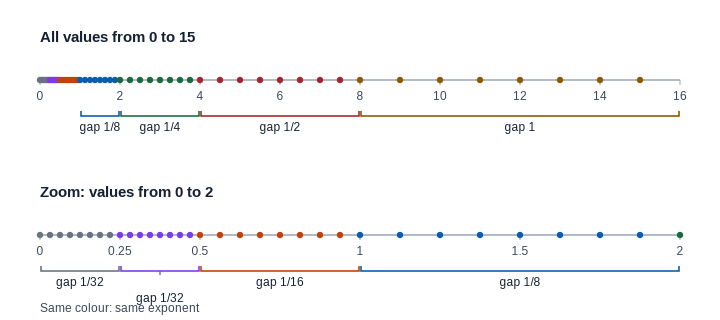
To decode seven cells, read them in three groups. The first cell is the sign .
The next three cells are the exponent field: read them as a natural number (including 0) from to , with the left cell the most significant, so is .
The last three cells are the fraction field, which we write .
Read them as a whole number in base , without the in front of them, and call it (a whole number from to ).
The fraction is divided by raised to the number of fraction cells, here :
For the fraction cells we have , and placing the values in the formula gives
The exponent in the formula can be negative, for example .
The exponent field, however, is a non-negative whole number.
Suggest a way: the three exponent cells can store only the numbers 0 to 7.
How would you store a negative exponent in them, for example , without adding a sign cell?
Hint
What happens if we add the same constant to every exponent before storing it?
To store negative exponents without another sign cell, the exponent is shifted by a constant called the bias.
The exponent field is , so .
When is the number of exponent cells, the usual bias is .
In the tiny format , so the bias is . (binary64 has and bias .)
Examples in the tiny format:
- is stored as (cells );
- is stored as (cells );
- is stored as (cells ).
For from to the value is
Work it out: the exponent field has eight values, and this formula covers six of them.
The cells 0 000 000 have . Use the same formula for and , and list the values.
Which number do the cells 0 000 000 store, and which positive number is the smallest?
How large is the interval from to that number, compared with the gap between neighbouring numbers?
A format needs a zero, because a calculation such as must have a result that can be stored.
It should also have no hole next to zero, where the gap between neighbours is suddenly much larger than the gaps just above it.
Then decide what should mean, so that the format has a zero and no hole next to it.
Hint
For the power of 2 is , so the value is .
Multiply out and write it over the common denominator .
Solution
With the formula gives
so for the values are , , and so on up to .
The gap between neighbours is . The cells 0 000 000 store , not zero, and no pattern of cells stores zero.
The smallest positive number is , so the interval from to it is :
eight times the gap between neighbours. So the formula as it stands leaves with no zero and a hole beside it, and needs a rule of its own.
Three candidate rules follow on this page.
We compare three meanings of on the numbers below , by the two requirements above:
a zero, and no hole next to it.
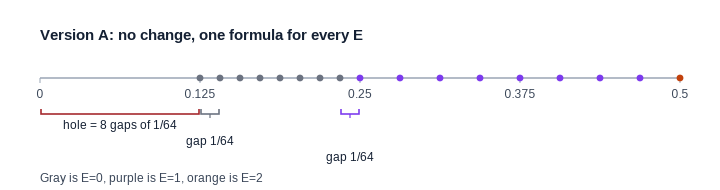
Version A: no change. The formula for from to is used for too.
There is no zero, and between and the smallest positive number there is a hole of eight gaps.
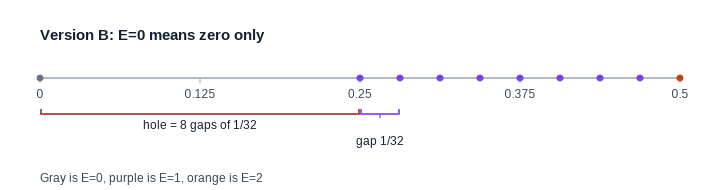
Version B: means zero only. The cheapest way to get a zero is to define that the first pattern of stores it, and to give up the other seven patterns.
Now zero exists, but the other seven patterns with store nothing.
The smallest positive number is , the number with and .
The gap above it is
so the hole from to is : again eight times the gap between neighbours.
A hole also makes subtraction misleading. Take the stored numbers and , which are different.
Their difference is , but this version stores nothing between and , so the computer rounds the result to the nearest stored number, :
it reports although .
Version C: the updated formula. We start from the natural continuation of the pattern:
when drops from 1 to 0, the exponent should drop by 1.
Lowering the exponent by 1 is multiplying by , and this is equivalent to moving all the digits of the significand one place to the right of the binary point, for example
so the leading 1 moves to the right side of the point. After the move we would need four fraction cells, and there are only three.
So we keep the exponent at , as for , and let the leading 1 travel to the right inside the three cells:
, then , then , and at the end all the cells are zeros.
In short, when two things change. The leading cell, the digit before the point in the significand, is instead of , so the significand is instead of .
The exponent is the one of , which is , and not .
The value is
This is zero when , and seven very small numbers when :
. They are called subnormal numbers; the numbers with from to are normal.
The gap between subnormal numbers is , exactly the gap just above , so there is no hole.
The difference of and is now stored exactly. More generally, take two different stored numbers and with the same sign and absolute value below :
their difference is a nonzero multiple of with absolute value below , so it is stored too, and only when .
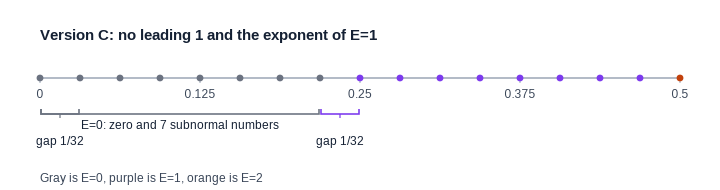
The exponent is so that the gap between subnormal numbers is , the same as the gap above :
the numbers then follow each other at equal gaps from 0 up to and keep the same gap after it, with no hole.
With the values would be : the gap would be , half of the gap above , and the largest subnormal number would leave a hole of below .
With the largest subnormal number is exactly one gap of below .
The updated formula is one formula for both kinds of number.
For it is written first in a short form, with the named quantities and , and then in full:
Here is the stored number, the sign cell, and the whole numbers in the exponent and fraction fields, and the number of fraction cells in the tiny format.
The two named quantities are:
- is the exponent that is actually used: for normal numbers, and when . Here is the larger of and . It is the same as before, now extended to ;
- is the leading cell of the significand: when and when . Here is the smaller of and . The letter comes from hidden bit: the leading cell is not stored in any of the cells, its value is fixed by the exponent field.
The words under the factors name their roles: the sign, the power of two and the significand.
Placing the values of the tiny format, with and bias , for two patterns of cells:
- the cells
0 011 101have and ; - the cells
0 000 101have and .
The hardware makes both choices with one test: are all the exponent cells ?
If at least one of them is , then and . If all of them are , then and .
So the two kinds of numbers are computed by one mechanism, a choice of the leading cell and of the exponent that is used, and not by two separate formulas.
The remaining value of the exponent field, , holds no number:
with it is infinity, and the other seven values of are NaN (Not a Number), the result of an operation with no value, such as zero divided by zero.
These are the eight combinations that gives, so they are not counted as values.
One way to see the bias: a split into two halves
This is our own explanation of why the bias has this value, a design rationale and not a statement quoted from the IEEE 754 standard.
Each value of covers an interval between two consecutive powers of 2.
The reason: for a fixed the numbers are , and the multiplier runs from up to just below .
In the tiny format, with bias :
| Positive values obtained | ||
|---|---|---|
| , as for | zero and numbers below | |
| from up to below | ||
| from up to below | ||
| from up to below | ||
| from up to below | ||
| from up to below | ||
| from up to below | ||
| infinity and NaN |
The bias splits the possible values of into two equal halves:
give , that is numbers whose absolute value is below , and give , that is or more.
In general the first half is the first values, from up to the bias.
The split is around , not around , because covers the interval from to .
Splitting around (that is versus ) would not give equal halves:
three values of against five. The sign cell is separate, so the same split holds for negative numbers by absolute value.
Now use the format yourself. Work it out: which number does the pattern 0 101 100 store?
Decode it with the formula (exponent field 101, bias 3), then set those bits in the explorer to check.
Stepping with the buttons shows what happens to the gap when the exponent changes.
IEEE 754: the format real computers use
Almost every computer follows the IEEE 754 standard of the Institute of Electrical and Electronics Engineers, first published in 1985 and updated since.
On almost all computers Python’s float is the 64-bit format, and NumPy offers the others.
| Format | Bits: s / e / f (sign, exponent, fraction) | Bias |
|---|---|---|
| binary16 (half precision) | 1 / 5 / 10 | 15 |
| binary32 (single precision) | 1 / 8 / 23 | 127 |
| binary64 (double precision) | 1 / 11 / 52 | 1023 |
The exponent is stored as a non-negative integer , the bias is added so that no sign bit is needed for the exponent, and the true exponent is .
For a normal binary64 number, with the integer value of the 52 fraction bits:
Worked example: 85.125. In binary:
The exponent is 6, so the stored exponent is in binary32 and in binary64.
The fraction bits are 010101001 followed by zeros. In binary32 the result is (sign, exponent, fraction):
0 10000101 01010100100000000000000The exponent field also has reserved patterns:
| Exponent field | Fraction field | Meaning |
|---|---|---|
| all zeros | zero | the number zero (there is a +0 and a −0) |
| all zeros | not zero | subnormal number: very small, with fewer significant bits |
| all ones | zero | infinity (positive or negative) |
| all ones | not zero | NaN, “not a number” |
| anything else | any | a normal number |
The rows for zero, subnormal numbers and normal numbers are one formula, the formula of the tiny format with the binary64 values:
bias and fraction cells, with the integer value of the fraction field.
For every exponent field except all ones
Here is the exponent that is used ( for normal numbers, when ), and is the hidden bit, the same two quantities as in the tiny format.
The test that sets is whether all 11 exponent cells are zero.
Infinity results from an overflow, a number too large for the format.
A result too small for the format is an underflow: it becomes a subnormal number or zero.
NaN is the result of an undefined operation such as infinity minus infinity.
The range of binary64
The binary64 formula gives the smallest numbers directly. The smallest positive normal number has , and .
The smallest positive subnormal number has , and , and in both cases :
The largest subnormal number, with , is : exactly below , so binary64 has no hole next to zero either.
The range table follows from the binary64 formula.
| Quantity | Value |
|---|---|
| largest finite number | about |
| smallest positive normal number | about () |
| smallest positive subnormal number | about () |
A result above the first row overflows to infinity, which then spreads through later calculations.
A result smaller than about half of the last row underflows to zero, silently:
a contribution that small is simply dropped from a sum.
Absolute error and relative error
We define a measure of the distance between a given number and a desired one.
Let be the true value and the stored or approximate one.
The absolute error is .
Which approximation is better? In the first the number is and the absolute error is .
In the second the number is and the absolute error is .
Decide, and give your reason in one sentence.
Solution
Measure each error as a fraction of the size of the number. In the first approximation the fraction is
and in the second it is
The second distance is much smaller than the first, but as a fraction of the size of the number it is 1000 times larger.
The first approximation is better.
The measure in the solution, the error as a fraction of the size of the number, is the relative error:
(for ). For example, comparing with gives an absolute error of and relative error exactly .
Bound it yourself: a number is rounded to significant digits, giving .
What is the largest possible absolute error, and what does it say about the relative error?
Hint
Rounding changes the number by at most half a unit of the last digit that is kept.
What is that unit worth, and what is the smallest value that can take?
The bound
Now the claim about significant digits can be stated exactly.
If we round a number to significant digits and get , the absolute error is at most half a unit in the -th digit, that is .
Since , the relative error is bounded:
The bound depends only on , not on the size of the number.
An example with : round to and to .
The formula gives both the same bound:
The absolute errors are very different: for the first and for the second, 10,000 times larger.
The relative errors are about the same, and both are below the bound:
The tiny format shows three facts, and they hold for real formats too.
- Only finitely many numbers exist. Everything else is replaced by a nearby stored number.
- The (absolute) gap between neighbours grows with the size of the numbers: for normal numbers it is constant between two consecutive powers of 2 and doubles at each power of 2; the subnormal numbers have the same gap as the smallest normal numbers.
- For ordinary numbers, the relative gap, that is, the gap divided by the number, stays within fixed limits. In the tiny format it is always between and : the gap is at 1 and 1 at 8, which is of the number both times.
The gap between 1 and the next larger stored number is called machine epsilon, written .
In the tiny format it equals . Near 1 the gap and the relative gap are equal, because we divide by 1; so machine epsilon is also the relative gap near 1, and it is the largest of the relative gaps of normal numbers (the relative gap of subnormal numbers is larger).
Try: in the tiny format, what is the number right after 4, and the number right after 0.5?
Use the number line of the tiny format, then confirm with its Next number button.
The line is in the section “From bits to a floating-point number”.
Solution
From the number line, the gap between 4 and 8 is , so the number after 4 is 4.5.
The gap between 0.5 and 1 is , so the number after 0.5 is 0.5625.
Back to the opening question. The binary expansions of 0.1, 0.2 and 0.3 never end, so binary64 stores a nearby number for each of them (with 52 fraction bits).
The computer adds the two stored numbers and rounds the sum to a stored number again, and this number differs from the stored 0.3, so 0.1 + 0.2 == 0.3 is False.
The exact stored values, the exact sum and the tie that decides the result are in the lecture Back to the Question: Rounding and Machine Epsilon.
Continue learning
The next step is the lecture Back to the Question: Rounding and Machine Epsilon.
It answers the opening question with exact numbers and shows how large the rounding error can be.
The practice session comes after it.